Integration Best Practices
This guide explains how to integrate the Caratwise Jewelry Builder into your e-commerce platform using best practices to give the best customer experience(Magento, Shopify, WooCommerce, OpenCart, or custom-built websites).
Quick Overview
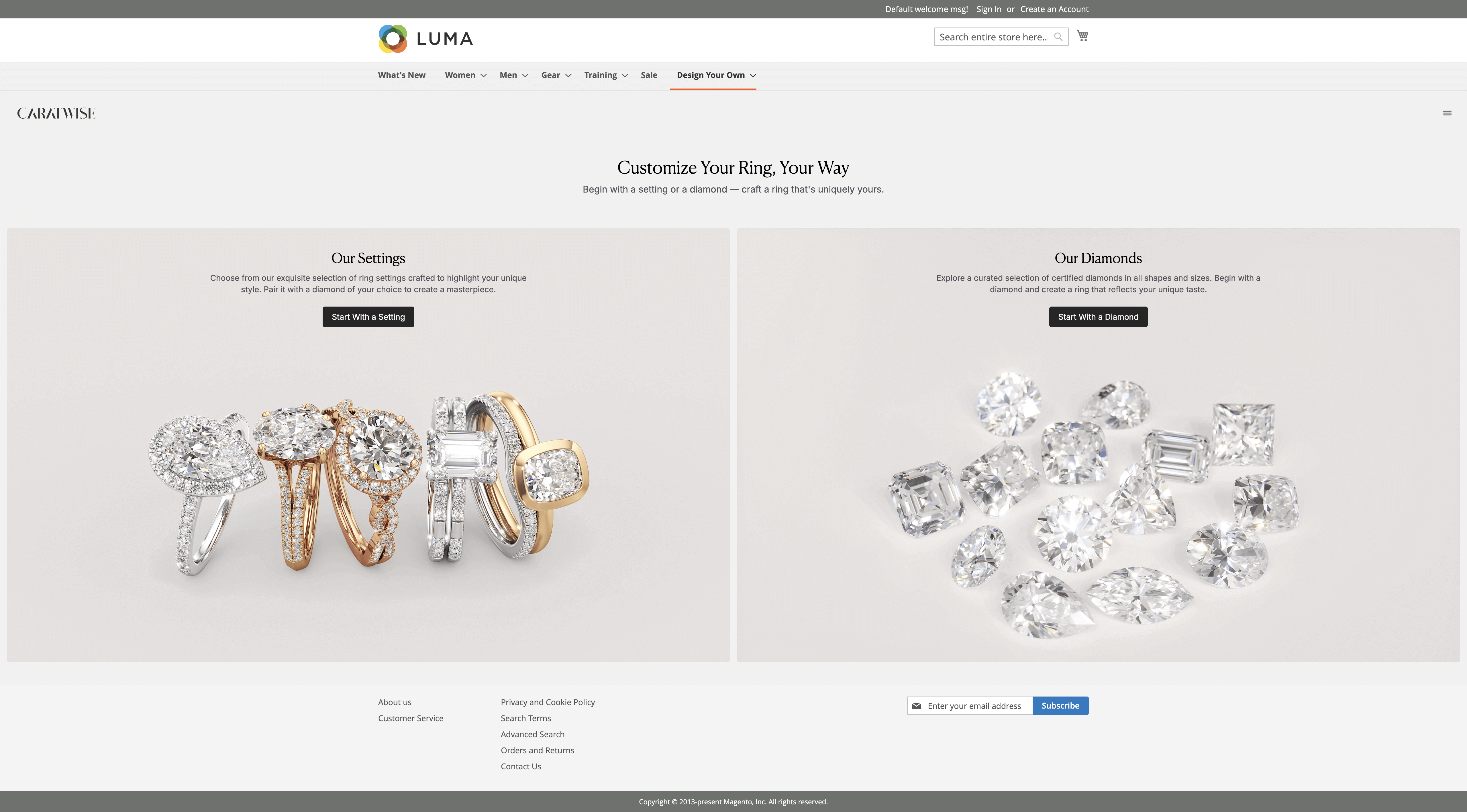
Builder (Customer Area)
✅ Important tips:
- Keep your website's header and footer intact.
- Ensure no other element's z-index overlaps with the builder.
- Make sure it doesn't break default website UI/UX and features.
Product Detail Page (PDP)
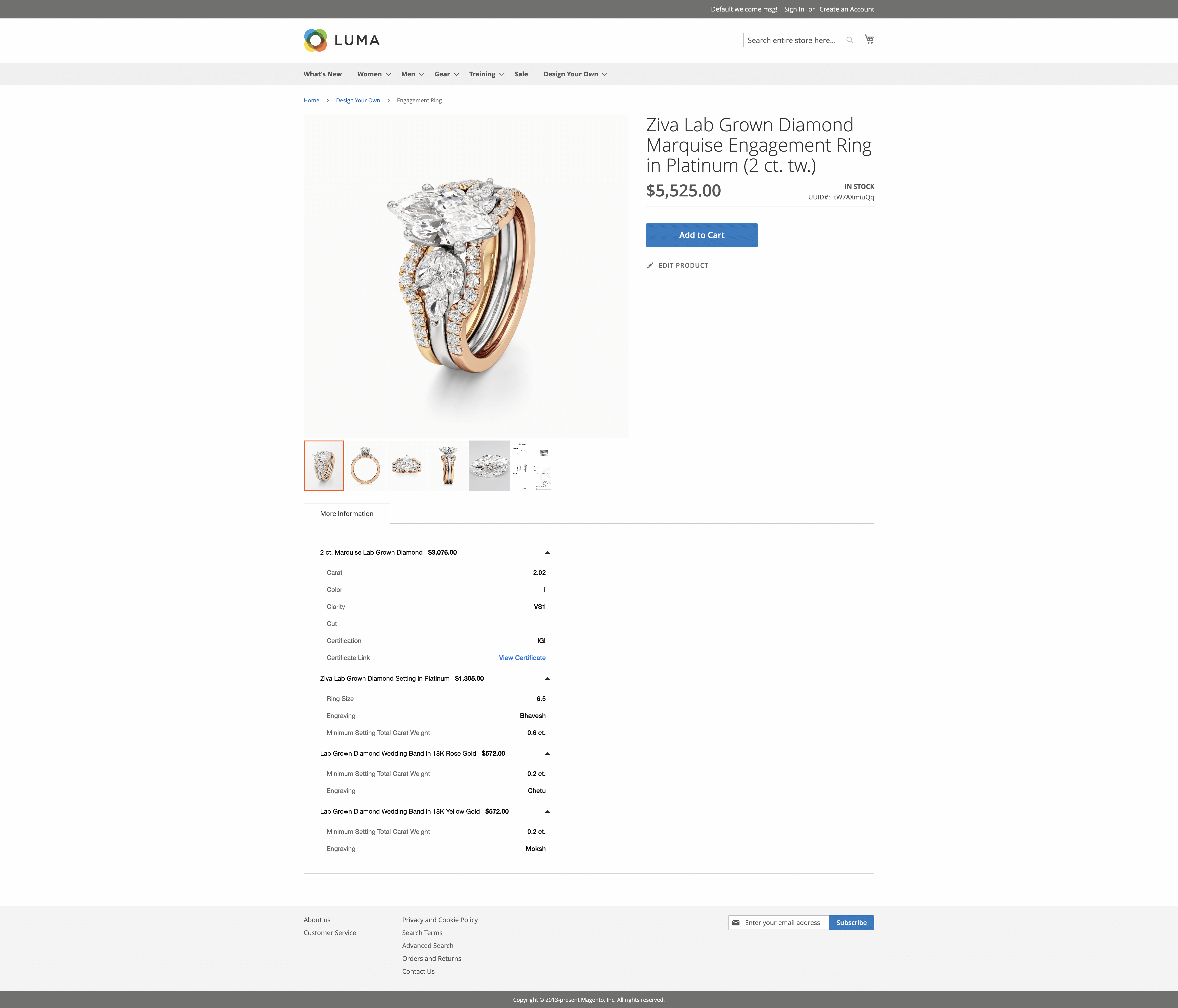
When redirecting from the builder:
- Capture the
uuid. - Use Caratwise APIs to fetch product data for the given
uuid. - Render a dynamic PDP with product image, attributes, price, etc.
👉 The PDP must include: - Add to Cart button
- Edit Product button with this URL (
/build-your-own/#/summary?uuid=xxxx) - Product attributes & status
- Product images
Cart Page
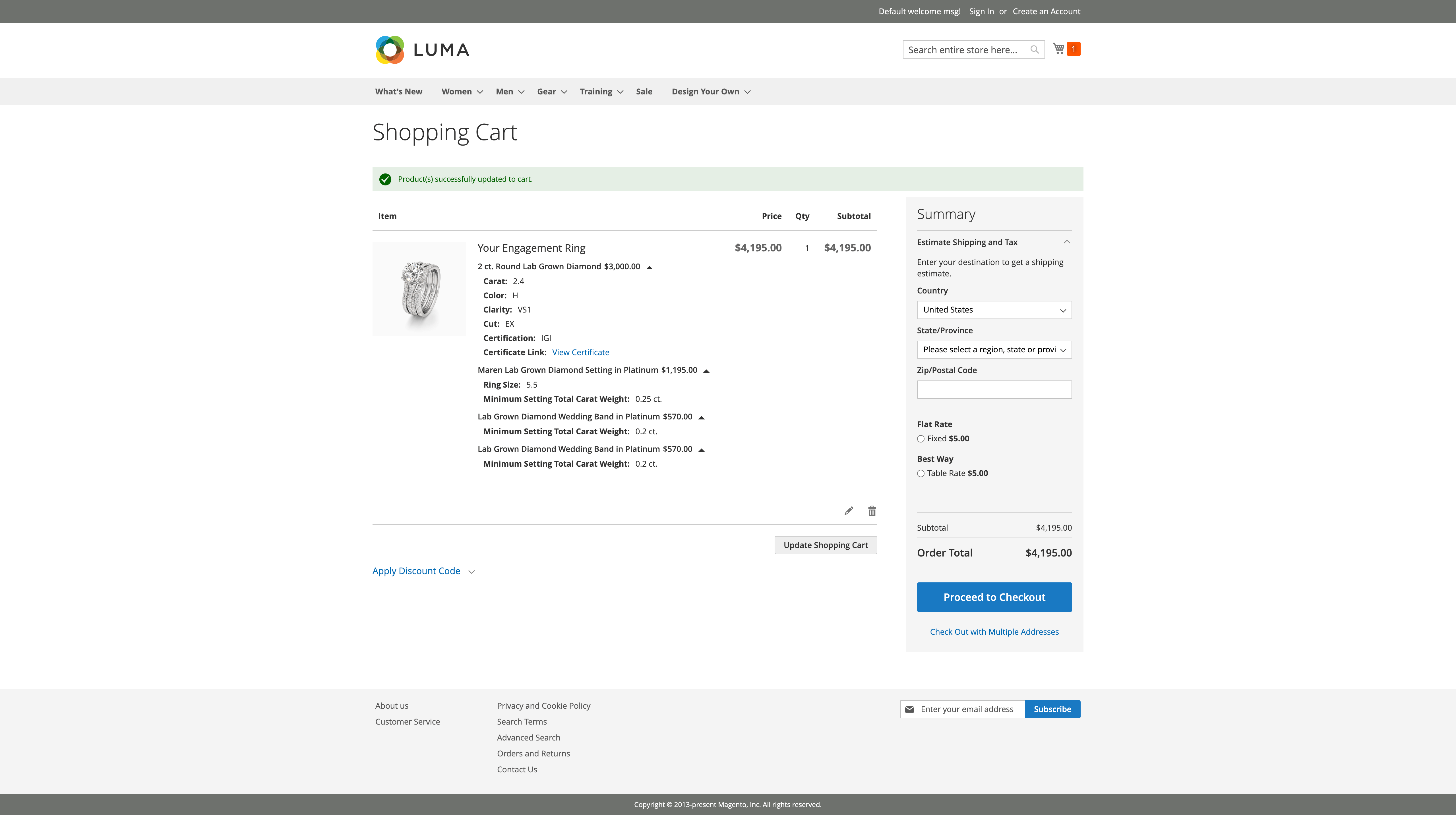
- Before adding to cart → call Inventory Check API.
- If stock is unavailable → show an error (prevent add to cart).
- Save the product's
uuidwith the cart item. - More tha 1 quantity is not supported so disable/remove quantity field.
- Editing a cart item → redirect back to builder summary page with the same
uuid. - Cart page must re-fetch uuid data and inventory status on every refresh until checkout complete or item is removed from the cart.
Checkout & Order Placement
Checkout follows your platform's default flow.
At the time of order placement: Call Inventory Check API again → block order if stock is unavailable.
- After successful payment:
- Call Create Order API to share order details with Caratwise.
- Save the returned Order Id and Item Ids in database an against each item.
Order Management (Customer Area)
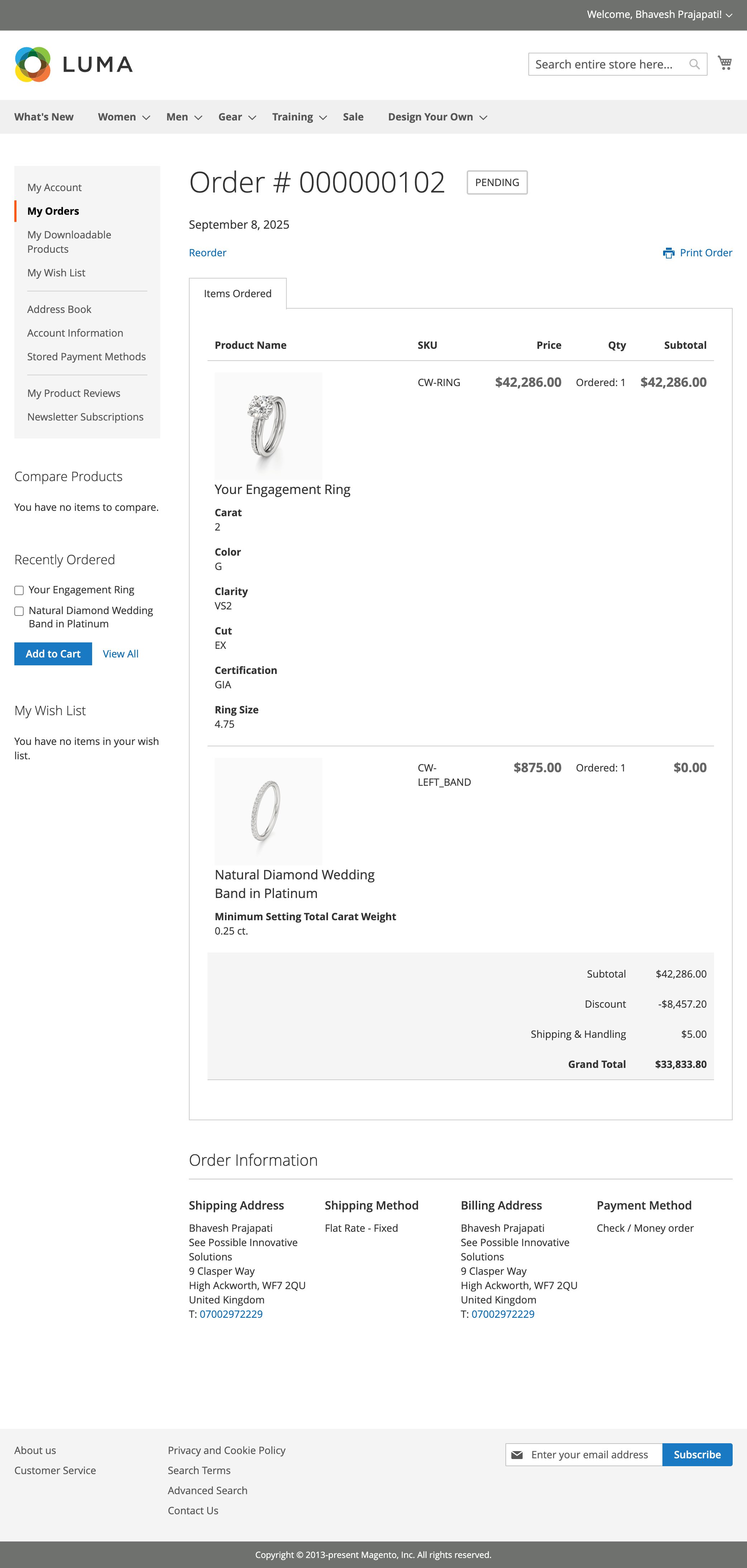
Customer Order view should show product image and selected attributes for customer reference.
✅ Important tips: Caratwise UUID, order Id, Item Id, Purchase Order Id are only for admin purpose so it should not show to customer.
Order Management (Admin Area)
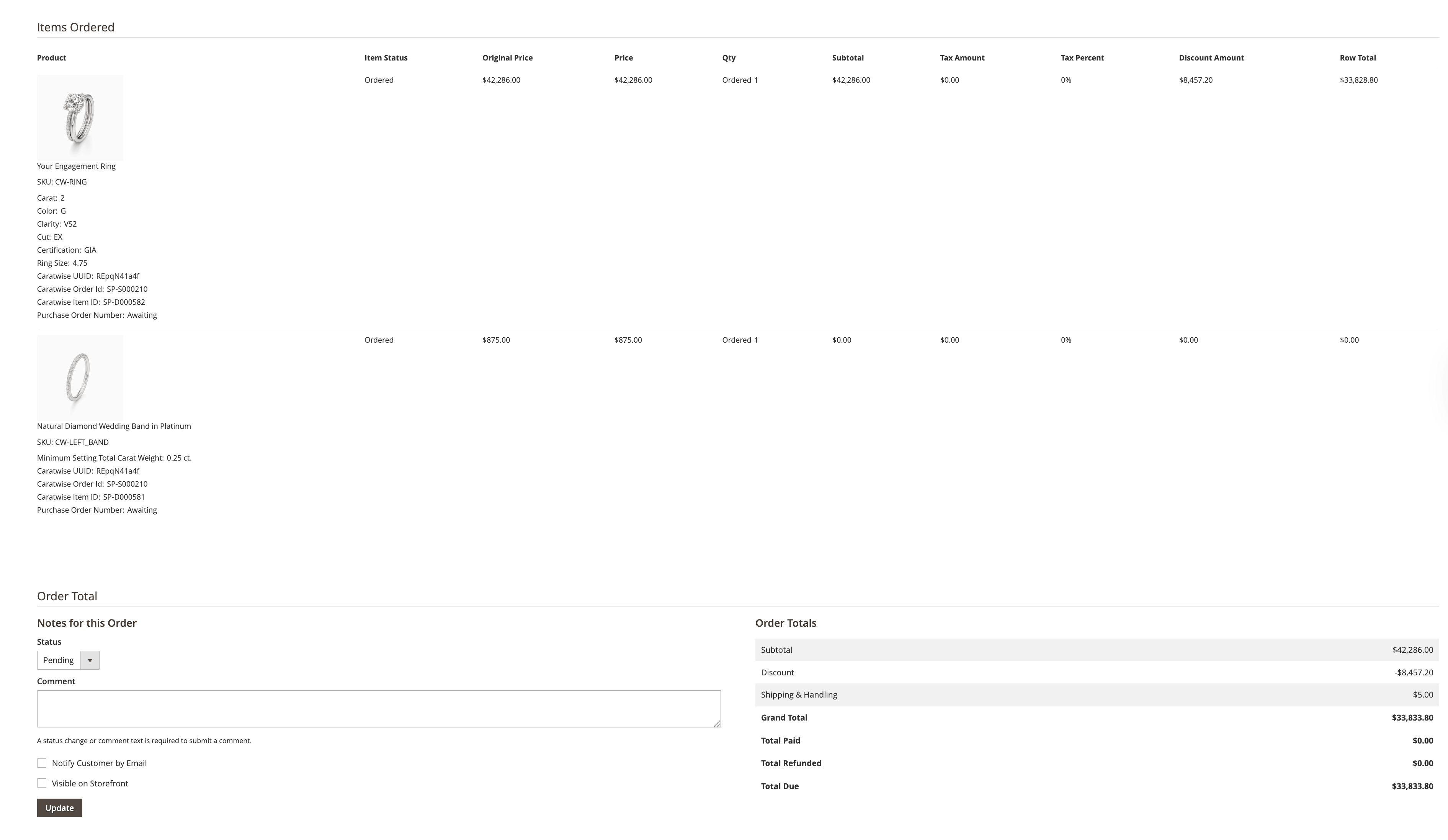
In the admin panel: - Show uuid, Caratwise Order ID, Item ID, and
customer-selected attributes.
- Customers should see their order as one design item, even if it maps to multiple internal SKUs.
- Display product images in the admin order view for all Caratwise items.
Route for Builder
Create a dedicated route for the builder page.
- Must be meaningful and user-friendly (e.g.,
/design-your-own). - Can be static or dynamic depending on the platform support.
Example (in Magento):
public const ROUTE = 'design-your-own';
CSP Configuration (Reference Table)
If your platform enforces Content Security Policy (CSP), you must allow the following domains to ensure the Caratwise Jewelry Builder loads correctly on your website.
| CSP Type | CSP URL |
|---|---|
| default-src, font-src, script-src, style-src | *.caratwise.com |
| frame-src, img-src | *.jewelverse.com |
| connect-src | *.experience.jewelry |
| img-src | d360.tech |
| img-src | ssi3.s3.us-east-2.amazonaws.com |
| img-src | caratwise.diam.me |
| img-src | dzzapkmv7cudp.cloudfront.net |
| img-src | *.view-360.video |
| img-src | d1k50q9h2ix2a2.cloudfront.net |
| img-src | video360view.com |
| img-src | d3at7kzws0mw3g.cloudfront.net |
| img-src | 360diamondvideo.com |
| font-src, img-src, script-src, style-src | d28rhx5jwsanvb.cloudfront.net |
✅ Tip: Always double-check CSP updates if new Caratwise builder features are released.
Menu Configuration (Reference Table)
| Label | URL Key |
|---|---|
| Engagement Rings | #/ring |
| Start with Diamond | #/diamond |
| Start with Setting | #/ring |
| Browse by Style | #/ring |
| Solitaire | #/ring?collections=SOLITAIRE&r=1 |
| Classic | #/ring?collections=CLASSIC&r=1 |
| Halo | #/ring?collections=HALO&r=1 |
| Three Stone | #/ring?collections=THREE_STONE&r=1 |
| Hidden Halo | #/ring?collections=HIDDEN_HALO&r=1 |
| Vintage | #/ring?collections=VINTAGE&r=1 |
| Nature | #/ring?collections=NATURE&r=1 |
| Twist | #/ring?collections=TWIST&r=1 |
| Browse by Shape | #/diamond |
| Round | #/diamond?dia_shape=RND&r=1 |
| Pear | #/diamond?dia_shape=PEA&r=1 |
| Oval | #/diamond?dia_shape=OVA&r=1 |
| Marquise | #/diamond?dia_shape=MAR&r=1 |
| Radiant | #/diamond?dia_shape=RAD&r=1 |
| Princess | #/diamond?dia_shape=PRC&r=1 |
| Emerald | #/diamond?dia_shape=EMR&r=1 |
| Cushion | #/diamond?dia_shape=CUS&r=1 |
| Browse by Metal | #/ring |
| 14k White Gold | #/ring?pri_comp_metal=14-WG&sec_comp_metal=14-WG&r=1 |
| 18k White Gold | #/ring?pri_comp_metal=18-WG&sec_comp_metal=18-WG&r=1 |
| 14k Rose Gold | #/ring?pri_comp_metal=14-RG&sec_comp_metal=14-RG&r=1 |
| 18k Rose Gold | #/ring?pri_comp_metal=14-RG&sec_comp_metal=14-RG&r=1 |
| 14k Yellow Gold | #/ring?pri_comp_metal=14-YG&sec_comp_metal=14-YG&r=1 |
| 18k Yellow Gold | #/ring?pri_comp_metal=18-YG&sec_comp_metal=18-YG&r=1 |
| Platinum Gold | #/ring?pri_comp_metal=PT-WG&sec_comp_metal=PT-WG&r=1 |
Admin Configuration (Magento Example)
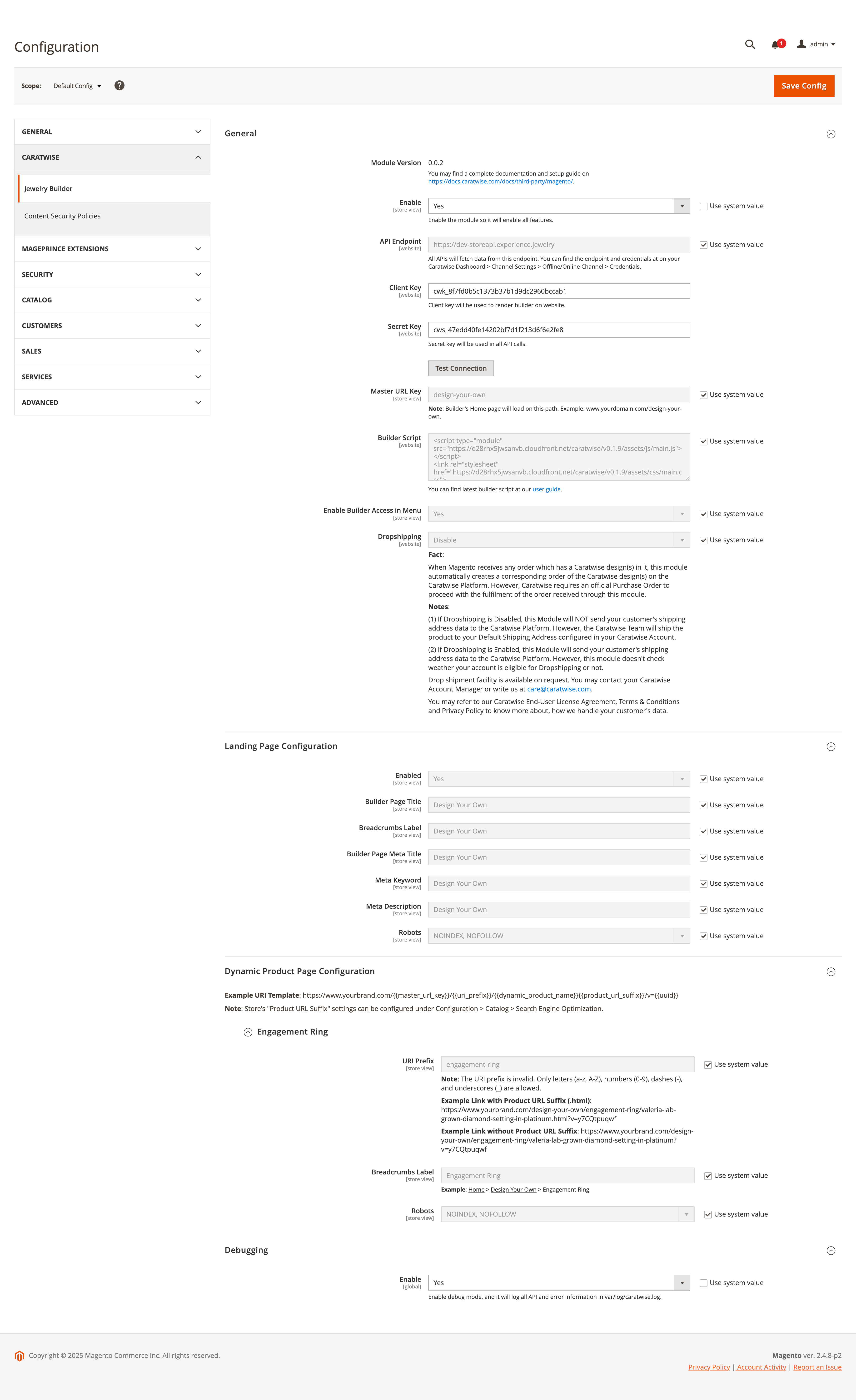
In Stores > Configuration > Caratwise Jewelry Builder:
- Enable:
Yes/No - API Endpoint:
https://dev-storeapi.experience.jewelry - Client Key:
cwk_test_xxxxx(used in builder and signing API Token) - Secret Key:
cws_test_xxxxx(used in signing API Token) - Master URL Key:
design-your-own - Builder Script: latest from
docsorwebhookconfigured in Caratwise backend - Enable Builder in Menu:
Yes/No - Drop-shipping:
Enable/Disable - Landing Page settings:
title, meta, SEO - Dynamic Product Page Configuration:
title, meta, SEO
FAQs
Q: Do I need to call Inventory Check API before Add to Cart?
✅ Yes. Always.
Q: When should I call Create Order API?
✅ After placing an order successfully.
Q: Can customers update the quantity of Caratwise items in the
cart?
❌ No. Quantity updates are not supported.
Q: What happens if inventory is not available during checkout?
❌ Block the order and show an error message.
Q: Can I customize the builder UI?
⚠️ You can keep your site's header/footer, but the builder layout itself
is not customisable.
Q: How do I handle returns or cancellations?
📦 Process normally in your platform.
Q: Can Caratwise products be combined with non-Caratwise products in
one cart?
✅ Yes, the platform's default cart flow continues to work.
Q: Do discounts, shipping, and taxes work for Caratwise products from integration platform?
❌ No, but you can apply discounts after adding to the cart from your platform.
Best Practices
- Always validate inventory before cart and before order placement.
- Keep routes & menu IDs consistent and meaningful.
- Ensure compatibility with future builder upgrades.
- Don't break platform's discount, shipping, and tax flows.
- Store Caratwise UUIDs with cart and order items.
- Test the full flow on staging before going live.
Support
If you need assistance:
Primary Contact
Email: mitul@dholakia.ai
Phone: +91-7574087515
Contact Information
Email: ankur@dholakia.ai
Phone: +91-9925228844